
How to Implement AI in a Small Business: A Practical Human-Review Framework
Practical AI Implementation & Human Review
Filed under
Practical AI Implementation & Human Review
Published
A seven-stage framework for choosing a useful workflow, setting human-review boundaries, testing exceptions, and measuring a small-business AI pilot before expanding it.
Small businesses rarely need “more AI.” They need one recurring part of the business to work better.
That distinction matters. A new tool can produce impressive demonstrations while leaving the actual workflow unchanged. Employees still copy information between systems. Owners still approve everything. Exceptions still arrive by text message. Nobody can tell whether the result is faster, safer, or more reliable.
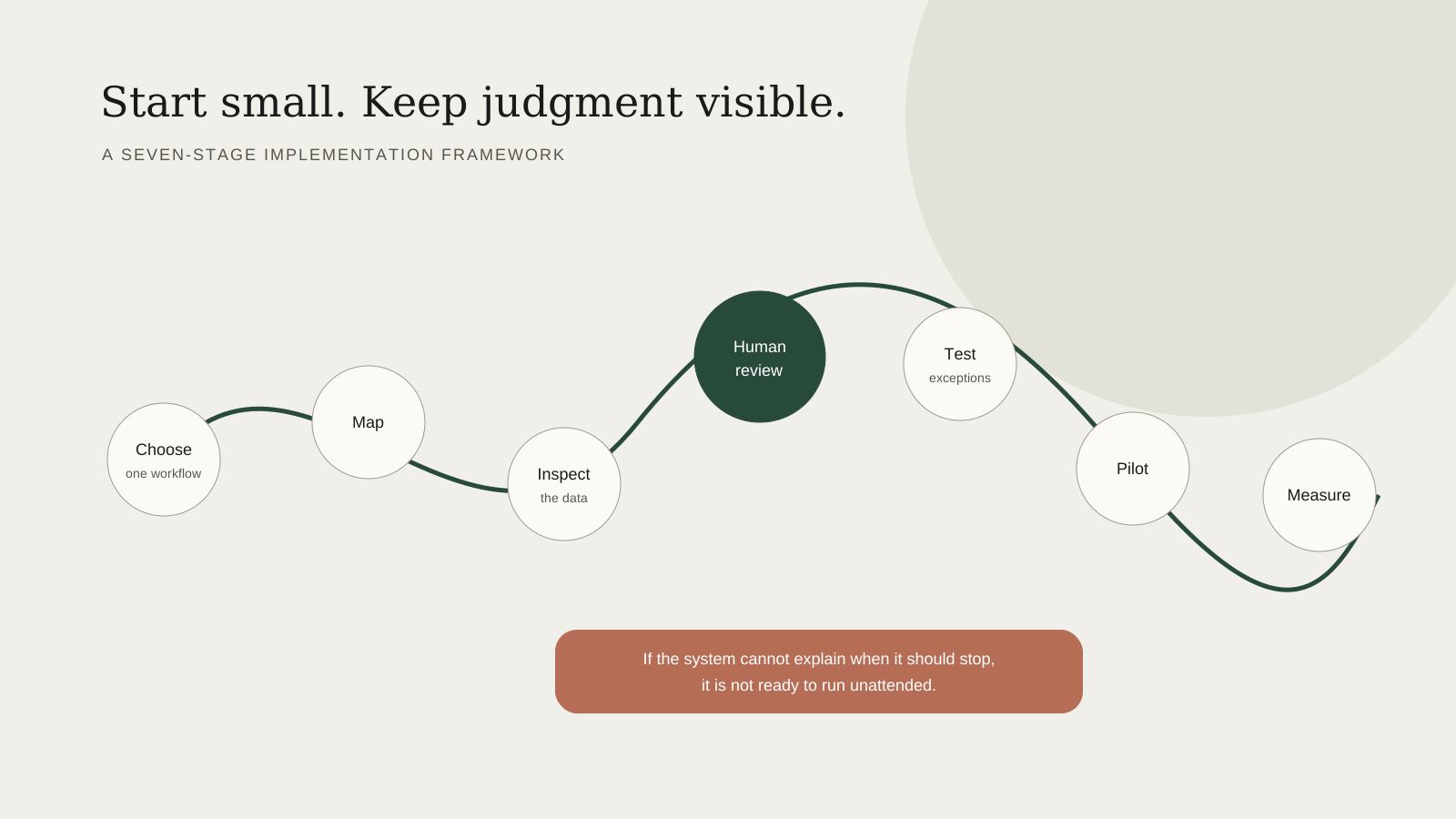
A practical implementation starts with the work, not the model. It gives the team clear roles, approved information sources, human-review points, exception handling, and a way to measure whether the change helped.
The seven-stage frameworkresearch → brief → draft → human review → publish → internal links → measurement.
1. Choose one recurring workflow
Start with a process that happens often enough to test and matters enough to improve.
Strong first candidates include inquiry follow-up, meeting preparation, recurring reports, spreadsheet cleanup, content briefs, document intake, and internal status summaries. The workflow should have a recognizable beginning and end.
Avoid starting with a broad instruction such as “automate operations.” Also avoid high-impact decisions involving medical care, legal conclusions, investments, hiring, payroll, housing, safety, or major financial commitments unless qualified professionals remain responsible and the controls are appropriate.
2. Map how the work happens now
Write down the real sequence, including the workarounds:
What starts the process?
Who touches it?
Which tools and files are used?
Where does information get copied or re-entered?
What commonly goes wrong?
Where does the owner become the bottleneck?
What proves the work is complete?
Do not design from the official procedure alone. The useful map includes the spreadsheet someone built, the email label only one employee understands, and the text message that rescues the process when the normal path fails.
3. Inspect the information and permissions
An AI-assisted workflow is only as dependable as the information it receives.
Identify the authoritative source for each important field. Decide what the system may read, what it may write, and what it should never access. Use the least privilege necessary, test with synthetic or sanitized data, and keep passwords and private client information out of prompts and informal notes.
If two sources disagree, define the rule. The correct response may be to stop and ask a person—not to guess.
4. Set the human-review boundary
Decide what the system may complete, what it may draft, and what always requires approval.
For example, a system may gather calendar details and prepare a meeting brief automatically, while a person approves a client-facing email. It may update a low-risk internal status field after validation, while any change involving money or contract terms pauses for review.
Name the reviewer and the expected response time. “A human will check it” is not a control unless the person, queue, and escalation path are clear.
5. Test normal cases and exceptions
Build a test set before the pilot begins. Include ordinary examples and difficult ones:
Missing required information
Conflicting dates or addresses
Duplicate submissions
Unusual client requests
A tool being unavailable
An AI output that sounds confident but is wrong
A task that completes only halfway
The National Institute of Standards and Technology’s AI Risk Management Framework emphasizes defined roles, documented oversight, testing, evaluation, and ongoing monitoring. Its Generative AI Profile also recommends comparing outputs with known information and using human oversight as part of evaluation. Those principles are useful even for a small, low-risk workflow.
6. Run a limited pilot
Keep the first pilot narrow. Use one team, one workflow, a defined time period, and a manual fallback.
During the pilot, record:
How often the workflow ran
How much review was required
Which exceptions appeared
Whether incorrect or incomplete actions were caught
Where employees were confused
Whether the system created new work elsewhere
Do not quietly expand the pilot because the first examples looked good. Reliability becomes visible through repetition.
7. Measure and decide How consistent and documentable is the decision?
Compare the pilot with the baseline. Useful measures may include minutes per occurrence, open-task visibility, response delay, error or rework count, number of owner approvals, and employee confidence using the process. What happens if the output is wrong or incomplete?
Label the evidence accurately. Separate measured facts from employee reports, estimates, and hypotheses. If the pilot helped, document what made it work before expanding. If it did not, determine whether the problem was the tool, the information, the workflow design, or the original assumption.
What implementation looks like for a two-person team
AI should not become a private assistant living on one employee’s computer.
For a two-person team, a complete system usually needs:
A named process owner
Individual accounts and appropriate permissions
A shared source of approved business knowledge
A consistent intake format
A visible task or status record
Reusable instructions and templates
Human-review points
Exception and fallback procedures
Training for both people
The technology can vary. The shared operating structure is what lets both people use it consistently.
A practical first-pilot scorecard
Score a candidate workflow from one to five on:
Value: Would improvement materially help clients, capacity, or reliability?
Frequency: Does it happen often enough to test?
Clarity: Are the rules and completion criteria understandable?
Readiness: Are the information sources reasonably organized?
Risk: What happens if the system is wrong or incomplete?
Measurability: Can the current and future process be compared?
The highest-value workflow is not always the best first workflow. A lower-risk process with clear data and frequent repetition may create a stronger foundation.
Practical beats impressive
The best first AI implementation may look ordinary. It may prepare a meeting, check a set of details, organize a spreadsheet, or make an unanswered inquiry visible.
That is not a limitation. Small, controlled improvements build the evidence, habits, and trust required for larger systems.
Start with a Workflow Opportunity Assessment, explore AI Implementation Services, or learn about Dale Mitchell’s founder and operating experience.
Related resources
Sources
Written by
Dale Mitchell
Founder, Aspen Workflow Company
Aspen-area business owner with approximately 20 years of hands-on website and digital-business experience, including operations, marketing, email systems, spreadsheets, SEO, photography, and videography.
Related service
